How to Make LINE Stickers from Dog and Cat Photos | Tips for Keeping Fur Natural
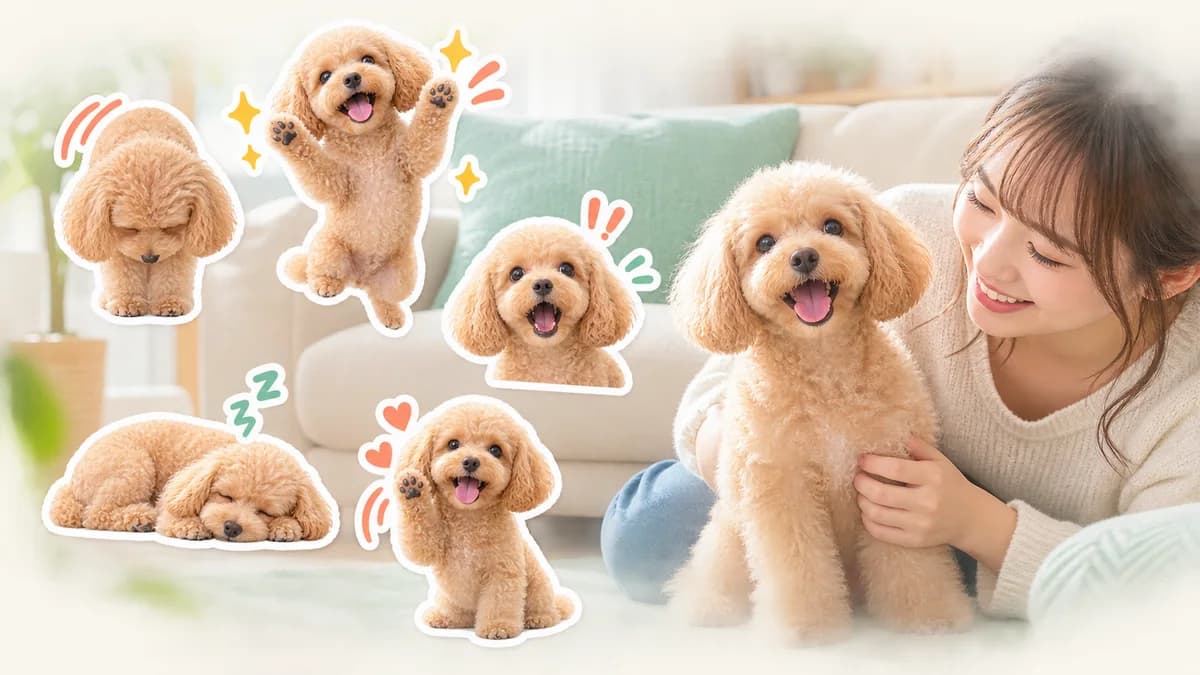
A pet sticker feels personal when the face, markings, ears, and favorite accessories still look like the real animal. The best results start before generation: choose a photo with a readable outline, decide which three features must stay, and judge the final images at the small size used in a chat.
Start here
- Choose a sharp photo where the eyes, ears, and body outline are visible.
- Fix three identity cues, such as coat color, ear shape, and collar.
- Use short phrases that match how you actually talk to your pet or family.
- Review the complete set for consistency before submitting anything.
Photos that work well for dog and cat stickers
Pick a photo with the pet facing the camera or turned enough for the body shape to be clear. Natural light near a window is helpful, but avoid strong backlight that turns the face into a dark silhouette. A single pet on its own is easier to use than a crowded photo with people, toys, or other animals overlapping.
You do not need a professional portrait. A favorite everyday photo can work if the eyes are open, the fur is not motion-blurred, and the important markings are visible. Take a moment to decide whether the intended set will show the pet's full body, face, or both.
Three ways to keep fur looking clean
Fur is detailed, so an image can look convincing when enlarged and muddy when reduced. Treat the edge as a design element: keep the large silhouette, preserve a few characteristic tufts, and avoid filling every tiny gap with noisy detail.
- Avoid a background that has almost the same color as the coat.
- Use a clear eye line and a stable head shape as the main reference.
- Check the cutout at the final sticker size, not only at high zoom.
Keep the same pet recognizable across the set
A set can have different poses without changing the character. Write down the three features that must remain fixed: for example, a white patch on the chest, triangular ears, and a blue collar. When reviewing each candidate, compare those features first, then judge the pose and expression.
If one image has a different coat pattern or facial proportion, it is usually better to regenerate or replace that image than to force it into the set. Consistency makes the stickers feel like one pet rather than a collection of similar animals.
A practical flow for making 40 pet stickers
Start with a free preview to check the character direction. Then choose the set size, define common phrases, and let the generation produce a batch of poses. In the editor, fix text and layout first, then inspect the face, ears, fur, collar, and tail across the entire set.
- Choose one clear reference photo.
- Describe the pet's identity cues and the tone of the set.
- Prepare everyday reactions such as hello, thanks, okay, sorry, and good night.
- Review all images together before spending time on individual edits.
- Download the transparent PNG ZIP only after the final check.
Short phrases work best on pet stickers
The pet is the star, so the phrase should be easy to read beside the face or body. Useful choices include Hello, Thanks, On my way, Good job, Sorry, Good night, and I am home. Leave space around the ears and tail, and avoid placing lettering where a moving or expressive pose will cover it.
A set feels more natural when it includes both practical replies and personality. Mix confirmations with moods: Okay, Really?, I am sleepy, Yay!, Wait a minute, and See you later. Choose words you would genuinely send, not only phrases that sound cute in isolation.
Rights and review checks for pet photos
Use a photo you took yourself or have permission to use. Check the background for another person's face, a logo, a shop sign, or a recognizable character. A pet being yours does not automatically grant permission to use every surrounding image or brand.
Before submission, confirm the text, transparency, dimensions, margins, main image, and tab image. AI generation can help with artwork, but you are still responsible for checking the final files and declaring AI use when the submission form requires it.
Start with one photo from an ordinary day
The most useful reference is often the photo that already feels like your pet: a familiar expression, a clear coat pattern, and a relaxed pose. Try that photo in Stampo's free preview, then decide whether the character remains recognizable before creating the full set.
FAQ
Can I make a set from only one dog or cat photo?
Yes. One clear reference photo can be enough for a first set. Choose a view that shows the face and the features you want to preserve, then check the generated images carefully for consistency.
Can the pet jump or make a large pose?
You can request expressive poses, but large movement makes it easier for the body shape or markings to drift. Start with a few clear poses and keep the identity cues fixed.
Will a sticker made from my pet's photo automatically pass review?
No. You still need to check rights, text, visibility, transparency, and the latest LINE review rules. The source photo being yours is only one part of the submission check.