Animated LINE Stickers or Animated LINE Emoji? How to Choose
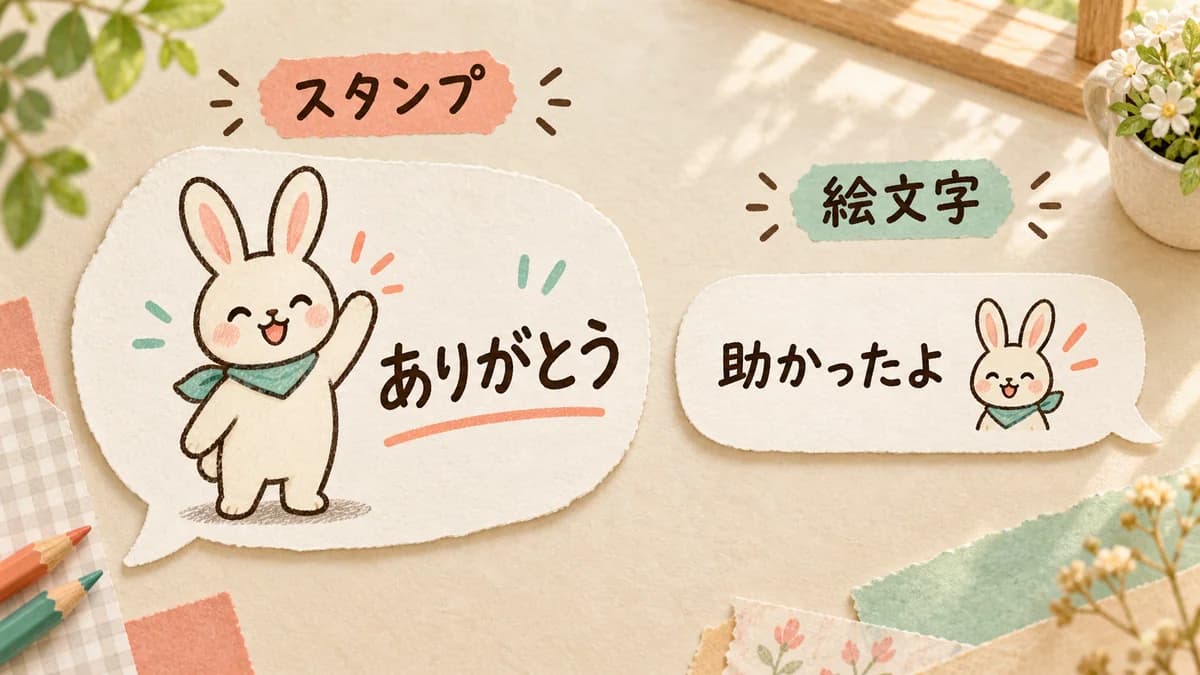
The same character can work as both an animated sticker and animated emoji, but the role in a conversation changes. A large sticker can be the whole reply. An emoji can sit beside your own words or react to a message. Decide which reply you send most often before deciding what to make.
The simple rule
- Choose an animated sticker when the character and a short phrase should be the main reply.
- Choose animated emoji when you want to keep your sentence and add a small expression.
- Emoji must remain clear inside a small chat bubble and as a reaction.
- The first frame should still communicate the feeling when motion is not playing.
Use emoji beside a sentence; use stickers for a standalone reply
If you want to write Thanks, that really helped today and add a small bowing character, animated emoji is a natural fit. Your words remain the message, while the face and motion add warmth.
If you want to send a single Okay, Good job, or See you with a large pose, an animated sticker is easier to read. The character and phrase become the center of the reply instead of an ornament beside text.
Use animated emoji when you want to react without adding a message
Emoji can be placed in a sentence, sent alone, or used as a reaction to a message. That makes them useful when you want to show a smile, thanks, or surprise without starting another line in a busy group chat. A reaction also makes it clear which message you are responding to.
A standalone emoji behaves more like a sticker, but its design still needs to survive the small in-bubble display. Think about both uses when choosing the face, outline, and amount of text.
Compare the use case before choosing the format
There is no rule that families must use stickers or work chats must use emoji. The right choice depends on whether the conversation needs a new reply, a small emotional signal, a full-body pose, or a readable phrase.
- Family confirmation: a sticker can make Okay feel like a complete reply; emoji can sit beside a schedule message.
- A friend's photo: a sticker can say Cute! by itself; emoji can accompany your own comment.
- A group announcement: a sticker adds a new message; emoji can react directly to the announcement.
- A pet's personality: stickers show full-body poses; emoji emphasizes the face, ears, and eyes.
- Work messages: keep the important detail in text and use a restrained emoji when appropriate.
For pet photos, choose the feature you want to preserve
If the important thing is a full-body bow, wagging tail, or raised paw, an animated sticker gives the pose room. If the important thing is a cat's eyes, ear shape, or expression, animated emoji can enlarge the face and use smaller motion.
Do not simply shrink a sticker to make an emoji. Long phrases and fine details disappear at small size. Keep the face or upper body large, use a strong outline, and choose one movement that can be recognized instantly.
Make the same Thanks move differently in each format
An animated sticker can show a readable Thanks with a smiling character that bows once. An animated emoji can show a large face nodding while your own sentence carries the words. Keep the face and lettering stable, and let one clear part of the character move.
A tiny movement is not automatically better for a tiny emoji. The moving area should be obvious, but the rest of the image should remain stable so the viewer can understand it in a glance. The first frame should already show the intended emotion.
Decide the type and set size before you start
LINE's official requirements for animated stickers and animated emoji are different. Check the latest number of items, image dimensions, file size, frame count, and loop rules for the format you will submit. In Stampo, animated sticker sets currently use 8, 16, or 24 items, while animated emoji sets use 16, 32, or 40 items.
Start with the replies you actually send: Hello, Okay, Thanks, Good night, and See you. A useful set with clear differences is easier to finish than a large set built from repeated motions.
Build the format that matches your conversation
In Stampo's creation flow, describe the character, audience, phrases, and movement together. Say whether the item should be a standalone reply or an expression beside your own sentence. Preview the character and motion plan before full generation, then use the editor to check the first frame, text, transparency, and playback.
FAQ
Can I use animated emoji as a reaction?
Yes. LINE supports using emoji as reactions in supported versions. The reaction use case is separate from sending an emoji in a sentence, so design and test both displays.
Can I send animated emoji by itself?
Yes. A standalone emoji can look more like a sticker, while an emoji inside a sentence is shown smaller. Make sure the face and motion work in both contexts.
Can I turn an animated sticker into an animated emoji by shrinking it?
Not without further work. You need the correct dimensions and file size, and you usually need to simplify the phrase, detail, and motion so the smaller display remains readable.
Can I make both formats with the same character?
Yes. Give stickers the role of a complete phrase or pose, and give emoji the role of a small expression or reaction. Treat each format as its own set when checking files and submission rules.